How to see 7TV, BTTV and FFZ emotes on iPhone
If you watch Twitch on a computer with a browser extension and then open the same stream on your phone, chat looks different. Messages that were full of animated emotes are now full of words like Stare, catJAM or WAYTOODANK. Nothing is wrong with your phone. The official app simply does not load third-party emotes.
Why the emotes are missing
Twitch has its own emotes, which every app shows. On top of those, most big channels use emotes from three community services: 7TV, BetterTTV (BTTV) and FrankerFaceZ (FFZ). Chatters type the emote’s name, and anyone with the matching extension or app sees the image instead of the word. Without it, you see the name.
Seeing them on iPhone and iPad
I make Twick, a free app for iPhone and iPad that loads 7TV, BTTV and FFZ emotes for every channel you open. When you open a stream, Twick fetches the global sets from all three services plus the channel’s own sets, then draws them in chat, including the animated ones.
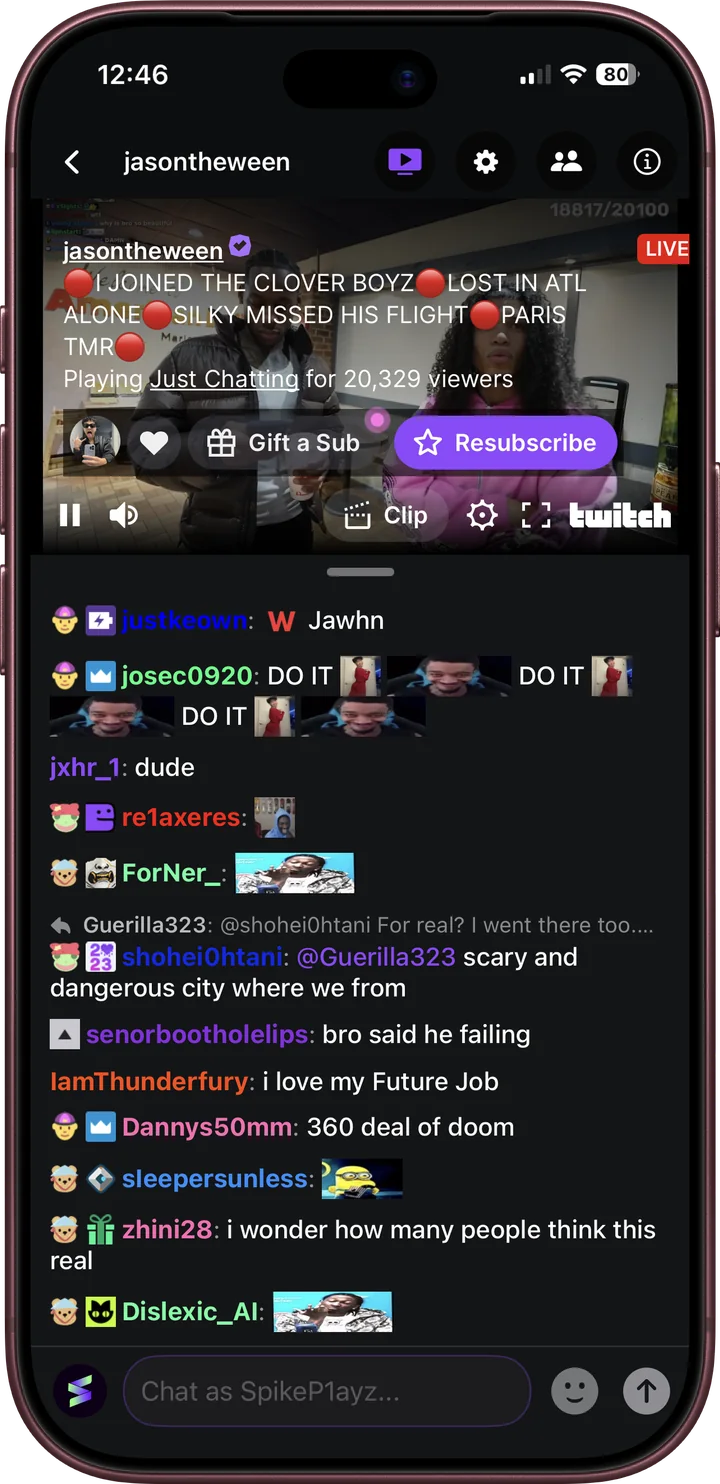
- Download Twick from the App Store.
- Search for a channel, or sign in with Twitch to see the channels you follow.
- Open the stream. Chat shows emotes the way it does on desktop.
If you are not sure what an emote is called, Twick shows its name and which service it comes from. The emote picker lists channel emotes, global emotes and Kick emotes, with search, so you can send them too after you sign in.
Kick works the same way
7TV emotes are common in Kick chat as well. Twick loads them for Kick channels too, so the same emotes show up whichever platform the streamer is on.